



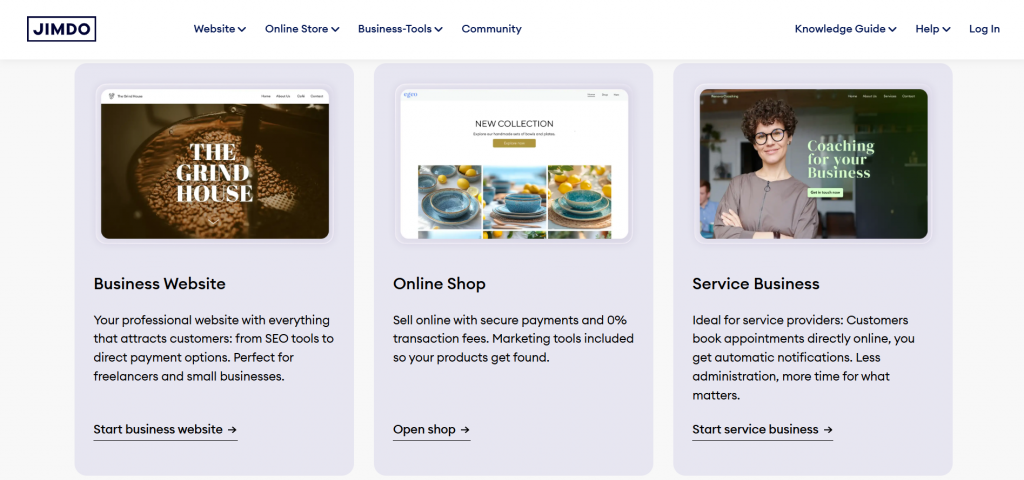
Welcome to the digital canvas of creativity! In today’s fast-paced online world, a stunning website isn’t just an option—it’s a necessity. Whether you’re launching a personal blog, showcasing your portfolio, or setting up an e-commerce store, making a lasting impression starts with great design. But fear not! You don’t need to be a coding whiz or hire an expensive designer to achieve that polished look. Enter Jimdo templates: your trusty allies in transforming ideas into breathtaking web experiences with ease. Join us as we dive into practical tips and tricks that will help you harness the full potential of Jimdo templates and craft a beautiful website that captivates visitors from the moment they land on your page! Let’s get started on this exciting journey toward design made easy!
Understanding the basics of web design
Web design is more than just aesthetics. It’s about creating a seamless experience for users visiting your site. The foundation lies in understanding layout, color theory, and typography. A well-structured layout guides visitors through your content. Use grids to organize elements neatly, ensuring that each section flows logically into the next. Color choice significantly impacts user perception and emotions. Select a palette that reflects your brand while also maintaining contrast for readability. Typography involves selecting fonts that are easy on the eyes and align with your site’s tone. Consistent font usage enhances professionalism. Remember to prioritize functionality alongside beauty. A visually stunning website won’t be effective if it’s hard to navigate or slow to load. By mastering these basics, you create an inviting digital space where users feel comfortable exploring what you have to offer.
Choosing the right Jimdo template for your website
Choosing the right Jimdo template is crucial for setting the tone of your website. With a plethora of options available, it’s essential to consider your brand identity first. What message do you want to convey? Think about the purpose of your site. Are you showcasing a portfolio, starting an online store, or blogging? Each type has templates tailored specifically for those needs, helping streamline design choices. Next, explore visual style and layout options that resonate with your audience. A minimalist approach might work wonders for a creative portfolio, while vibrant colors could enhance an e-commerce platform. Don’t forget functionality! Ensure that the template allows easy navigation and access to features specific to your goals. It’s all about finding balance between aesthetics and usability to create something truly impactful.
Customizing your template: colors, fonts, layout, and more

Customizing your Jimdo template is where the magic happens. It’s your chance to make a strong impression and showcase your brand’s unique personality. Start with colors. Choose a palette that resonates with your audience. Consider using complementary shades to create harmony or bold contrasts for visual impact. Next, focus on fonts. Select typefaces that reflect your brand’s voice. Whether you prefer modern sans-serifs or classic serifs, ensure readability across all devices. Layout plays a crucial role in user experience. Adjust sections to highlight key content and guide visitors through your site smoothly. Use whitespace strategically to avoid clutter. Lastly, don’t overlook small details like buttons and icons. These elements can enhance navigation while reinforcing branding when aligned with overall design choices. Each customization adds depth and character, making visitors feel more connected to what you offer.
Utilizing Jimdo’s features and tools for a professional-looking website
As a website creator, it is important to utilize all the features and tools available to you in order to create a professional-looking website. Luckily, Jimdo offers a variety of features and tools that can help elevate your website design and functionality. One of the first features to take advantage of when using Jimdo templates is the customizable layout options. With Jimdo’s drag-and-drop feature, you can easily rearrange elements on your page and create a unique layout that suits your brand or business. This allows for flexibility in design and ensures that your website stands out from others using the same template. Another useful tool for creating a professional website is the selection of high-quality images offered by Jimdo. These images are free to use and can be easily inserted into your pages, providing visual appeal and enhancing the overall aesthetic of your website. Additionally, you have the option to upload your own images or purchase premium stock photos directly through Jimdo.
Tips for creating engaging content
Creating engaging content starts with knowing your audience. Research their interests and preferences to tailor your message. Use a conversational tone that invites readers in. Write as if you’re speaking to a friend, making the text relatable and approachable. Visuals can significantly enhance engagement. Incorporate images, infographics, or videos that complement your written content and break up long blocks of text. Don’t forget about storytelling. Weave narratives into your posts; they captivate attention and make information memorable. Interactive elements also boost involvement. Consider utilizing polls or quizzes that encourage participation while gathering insights about your audience’s preferences. Lastly, always include a clear call-to-action at the end of each piece. Guide readers on what to do next—whether it’s commenting, sharing, or exploring more of your site’s offerings.
Incorporating multimedia elements into your design

Incorporating multimedia elements into your design can greatly enhance the overall look and feel of your website. By using a variety of media such as images, videos, and animations, you can create a visually stunning and engaging experience for your visitors. Here are some tips for effectively incorporating multimedia elements into your Jimdo template When choosing images for your website, make sure they are high-resolution and relevant to your content. Large images can slow down the loading speed of your website, which can negatively impact user experience. Organize multimedia elements in a way that creates a clear visual hierarchy on each page. To make multimedia elements stand out, use contrasting colors in their placement within the design. Incorporating multimedia elements into your Jimdo template can help bring your website to life and make it more engaging for visitors. Remember to keep these tips in mind and use media strategically to create a beautiful and functional website that stands out from the rest.
Ensuring a user-friendly and mobile-responsive website
Creating a user-friendly website is crucial. It’s all about simplicity and ease of navigation. Visitors should find what they need without hassle. Mobile responsiveness is non-negotiable today. More people browse on their phones than ever before. A responsive design adjusts seamlessly to any screen size, ensuring your site looks great everywhere. Consider touch interactions too. Make buttons easy to tap and links clear to follow. This small detail can significantly enhance the user experience. Loading speed also matters immensely. Optimize images and streamline content for quick access, especially on mobile devices. Finally, always test your website across various devices and browsers. Regular updates ensure everything functions smoothly as technology evolves. User feedback can be invaluable here; it offers insights into potential improvements that may not have crossed your mind initially.